
How we validate
our work.
Getting the work right comes first. Business rules, data, integrations, permissions, and recovery from failures all matter. Performance and accessibility are part of that work, and this website gives you an example you can inspect.
What does your vendor validate?
Can the right people complete the work? Can someone see records they shouldn't? What happens when an integration times out or a request is sent twice? Ask how those answers are tested, as well as how the software scores in a public scan.
The checks behind the software.
- Business rules and connected workflows.
- ByteWish's Form 990-PF workflow checks XML against the selected IRS schema, packages the submission, and records the returned acknowledgement. Each step matters to the filing outcome. See the IRS integration.
- Permissions and data protection.
- Application security includes who can access a record, how services authenticate, and how sensitive fields are protected. Our ByteWish work combines organization permissions, Microsoft identity, encrypted financial fields, and managed service identity. Explore the application controls.
- Failure paths, tested automatically.
- This site's unit, API, and browser tests cover isolated chat sessions, repeated requests, interrupted response streams, attachment delivery, and authenticated staff actions. They also check that private files and credentials stay out of the public build. See the release process.
- People using the software.
- We put working software in front of your team early and improve it with their feedback. Automated checks support that work; staff need to be able to complete their real tasks. See how we deliver and support it.
This website's measured results.
The report below covers this website. It brings together performance, accessibility, and browser results, with the tested pages and checks listed so you can see exactly what passed.
Lighthouse scores
Pages tested: Home, Delivery and support, Appointments, Careers, Contact, LRC case study, ByteWish case study, Accessibility case study, Security and trust, Security standards, Procurement information, Writing a software RFP, County government, Capability brief, Privacy policy, Validation example. Three runs per page on mobile and desktop.
| Category | Mobile | Desktop |
|---|---|---|
| Performance | 100 | 100 |
| Accessibility | 100 | 100 |
| Best practices | 100 | 100 |
| SEO | 100 | 100 |
Agentic Browsing and the experimental autocomplete audit are enabled on every page. All applicable checks passed in all 96 runs. Results for each page and audit are included in the downloadable report.
axe and IBM Equal Access
All 16 pages, desktop and mobile, with expanded disclosures on every page and homepage mobile navigation. WCAG 2.2 AA is our baseline. Applicable AAA rules check enhanced contrast, consistent link purpose, and automatic page refresh.
| Engine and target | Scans | Failed |
|---|---|---|
| axe-core 4.13.0 WCAG 2.2 AA | 34 | 0 |
| IBM Equal Access 4.0.34 WCAG 2.2 AA | 34 | 0 |
| axe-core 4.13.0 Applicable AAA rules | 34 | 0 |
Items requiring human review are retained with the test evidence. AAA results cover the named rules.
216 browser checks passed
All 16 redesigned pages. Automated WCAG checks found zero violations in the tested desktop and mobile states, including expanded disclosures on every page and homepage mobile navigation.
- Keyboard access, skip link, visible focus, and disclosure controls
- Layouts from 320 to 1440 pixels, 200% text resizing, and WCAG text spacing
- High-contrast mode and reduced-motion preferences
- Menus, contact links, printing, and operation without JavaScript
- Page metadata, local runtime resources, and private-file blocking
View all 216 browser checks
- axe AA: WCAG 2.2 desktop and mobile: /
- IBM AA: WCAG 2.2 desktop and mobile: /
- axe AAA: WCAG 2.2 desktop and mobile: /
- 320px reflow and WCAG text spacing: /
- 200% text resizing keeps content within the page: /
- page metadata and same-origin runtime resources: /
- axe AA: WCAG 2.2 desktop and mobile: /delivery.html
- IBM AA: WCAG 2.2 desktop and mobile: /delivery.html
- axe AAA: WCAG 2.2 desktop and mobile: /delivery.html
- 320px reflow and WCAG text spacing: /delivery.html
- 200% text resizing keeps content within the page: /delivery.html
- page metadata and same-origin runtime resources: /delivery.html
- axe AA: WCAG 2.2 desktop and mobile: /appointments.html
- IBM AA: WCAG 2.2 desktop and mobile: /appointments.html
- axe AAA: WCAG 2.2 desktop and mobile: /appointments.html
- 320px reflow and WCAG text spacing: /appointments.html
- 200% text resizing keeps content within the page: /appointments.html
- page metadata and same-origin runtime resources: /appointments.html
- axe AA: WCAG 2.2 desktop and mobile: /careers.html
- IBM AA: WCAG 2.2 desktop and mobile: /careers.html
- axe AAA: WCAG 2.2 desktop and mobile: /careers.html
- 320px reflow and WCAG text spacing: /careers.html
- 200% text resizing keeps content within the page: /careers.html
- page metadata and same-origin runtime resources: /careers.html
- axe AA: WCAG 2.2 desktop and mobile: /contact.html
- IBM AA: WCAG 2.2 desktop and mobile: /contact.html
- axe AAA: WCAG 2.2 desktop and mobile: /contact.html
- 320px reflow and WCAG text spacing: /contact.html
- 200% text resizing keeps content within the page: /contact.html
- page metadata and same-origin runtime resources: /contact.html
- axe AA: WCAG 2.2 desktop and mobile: /lrc.html
- IBM AA: WCAG 2.2 desktop and mobile: /lrc.html
- axe AAA: WCAG 2.2 desktop and mobile: /lrc.html
- 320px reflow and WCAG text spacing: /lrc.html
- 200% text resizing keeps content within the page: /lrc.html
- page metadata and same-origin runtime resources: /lrc.html
- axe AA: WCAG 2.2 desktop and mobile: /bytewish.html
- IBM AA: WCAG 2.2 desktop and mobile: /bytewish.html
- axe AAA: WCAG 2.2 desktop and mobile: /bytewish.html
- 320px reflow and WCAG text spacing: /bytewish.html
- 200% text resizing keeps content within the page: /bytewish.html
- page metadata and same-origin runtime resources: /bytewish.html
- axe AA: WCAG 2.2 desktop and mobile: /accessibility.html
- IBM AA: WCAG 2.2 desktop and mobile: /accessibility.html
- axe AAA: WCAG 2.2 desktop and mobile: /accessibility.html
- 320px reflow and WCAG text spacing: /accessibility.html
- 200% text resizing keeps content within the page: /accessibility.html
- page metadata and same-origin runtime resources: /accessibility.html
- axe AA: WCAG 2.2 desktop and mobile: /trust.html
- IBM AA: WCAG 2.2 desktop and mobile: /trust.html
- axe AAA: WCAG 2.2 desktop and mobile: /trust.html
- 320px reflow and WCAG text spacing: /trust.html
- 200% text resizing keeps content within the page: /trust.html
- page metadata and same-origin runtime resources: /trust.html
- axe AA: WCAG 2.2 desktop and mobile: /standards.html
- IBM AA: WCAG 2.2 desktop and mobile: /standards.html
- axe AAA: WCAG 2.2 desktop and mobile: /standards.html
- 320px reflow and WCAG text spacing: /standards.html
- 200% text resizing keeps content within the page: /standards.html
- page metadata and same-origin runtime resources: /standards.html
- axe AA: WCAG 2.2 desktop and mobile: /procurement.html
- IBM AA: WCAG 2.2 desktop and mobile: /procurement.html
- axe AAA: WCAG 2.2 desktop and mobile: /procurement.html
- 320px reflow and WCAG text spacing: /procurement.html
- 200% text resizing keeps content within the page: /procurement.html
- page metadata and same-origin runtime resources: /procurement.html
- axe AA: WCAG 2.2 desktop and mobile: /rfp.html
- IBM AA: WCAG 2.2 desktop and mobile: /rfp.html
- axe AAA: WCAG 2.2 desktop and mobile: /rfp.html
- 320px reflow and WCAG text spacing: /rfp.html
- 200% text resizing keeps content within the page: /rfp.html
- page metadata and same-origin runtime resources: /rfp.html
- axe AA: WCAG 2.2 desktop and mobile: /counties.html
- IBM AA: WCAG 2.2 desktop and mobile: /counties.html
- axe AAA: WCAG 2.2 desktop and mobile: /counties.html
- 320px reflow and WCAG text spacing: /counties.html
- 200% text resizing keeps content within the page: /counties.html
- page metadata and same-origin runtime resources: /counties.html
- axe AA: WCAG 2.2 desktop and mobile: /capabilities.html
- IBM AA: WCAG 2.2 desktop and mobile: /capabilities.html
- axe AAA: WCAG 2.2 desktop and mobile: /capabilities.html
- 320px reflow and WCAG text spacing: /capabilities.html
- 200% text resizing keeps content within the page: /capabilities.html
- page metadata and same-origin runtime resources: /capabilities.html
- axe AA: WCAG 2.2 desktop and mobile: /privacy.html
- IBM AA: WCAG 2.2 desktop and mobile: /privacy.html
- axe AAA: WCAG 2.2 desktop and mobile: /privacy.html
- 320px reflow and WCAG text spacing: /privacy.html
- 200% text resizing keeps content within the page: /privacy.html
- page metadata and same-origin runtime resources: /privacy.html
- axe AA: WCAG 2.2 desktop and mobile: /quality.html
- IBM AA: WCAG 2.2 desktop and mobile: /quality.html
- axe AAA: WCAG 2.2 desktop and mobile: /quality.html
- 320px reflow and WCAG text spacing: /quality.html
- 200% text resizing keeps content within the page: /quality.html
- page metadata and same-origin runtime resources: /quality.html
- keyboard skip link reaches main content and focus is visible
- keyboard opens and closes native disclosures
- reduced motion disables scrolling and decorative transitions
- forced colors retains keyboard focus and mobile navigation
- appointments Scalar: on-demand, local assets, CSP, keyboard and WCAG 2.2 at 1440
- appointments Scalar: on-demand, local assets, CSP, keyboard and WCAG 2.2 at 390
- accessibility Scalar: on-demand, local assets, CSP, keyboard and WCAG 2.2 at 1440
- accessibility Scalar: on-demand, local assets, CSP, keyboard and WCAG 2.2 at 390
- Scalar contract download and renderer failure keep an accessible fallback
- browser search and text selection stay visible at 1440px with scripts true
- browser search and text selection stay visible at 1440px with scripts false
- browser search and text selection stay visible at 390px with scripts true
- browser search and text selection stay visible at 390px with scripts false
- every page section remains readable when scrolled into view at 1440px
- every page section remains readable when scrolled into view at 390px
- lower homepage sections render for fragments, history and print at 1440px
- lower homepage sections render for fragments, history and print at 390px
- intent prefetch loads only the static destination without starting chat
- persistent chrome, back navigation and reduced motion at 1440px
- persistent chrome, back navigation and reduced motion at 390px
- every route swaps content and SEO metadata under the original security policy
- chat stays open with its draft and contact details while navigating
- page tools work after repeated soft navigation without duplicate handlers
- a modified lazy chat controller is blocked, and a valid retry works
- chat can finish loading when navigation happens during its download
- chat launcher has a stable first layout while its script loads and hides during chat
- without JavaScript the chat launcher is hidden and direct contact remains available
- chat starts with a message, supports handoff, safe replies, reload and ending
- optional contact details accompany chat, can change later and restore on reload
- streamed replies arrive before completion, follow the bottom and respect reading older messages
- reopening a long transcript and late pictures keep the latest message in view
- AI chat and human handoff are accessible at desktop and mobile sizes
- keyboard sends, Shift Enter adds a line, Escape minimizes and returns focus
- failed submissions preserve drafts and reuse request id on retry
- after-hours handoff sends immediately and describes a later staff reply
- unconfigured chat keeps email and phone usable without claiming AI is present
- unknown office hours do not imply a closure or an available team member
- ending a chat keeps the composer usable and the next send starts a fresh conversation
- a message typed during initial loading submits once when availability arrives
- chat can open while office hours are still loading without cookie coordination
- a staff-closed conversation can start again directly from the composer
- a status response from before End chat cannot restore the old conversation
- an assistant-triggered handoff switches to the team without a second visitor action
- pictures can be previewed, removed and sent without text; lifecycle updates are chat events
- chat credentials survive reload in this tab, protect pictures and clear on End chat
- chat still authorizes subsequent messages when browser storage is blocked
- invalid browser session is cleared: corrupt
- invalid browser session is cleared: expired
- a server-expired session returns to a fresh chat without losing the draft
- missing pages return 404 with accessible recovery links on desktop and mobile
- SRI matches delivered script and stylesheet bytes: /
- SRI matches delivered script and stylesheet bytes: /delivery.html
- SRI matches delivered script and stylesheet bytes: /appointments.html
- SRI matches delivered script and stylesheet bytes: /careers.html
- SRI matches delivered script and stylesheet bytes: /contact.html
- SRI matches delivered script and stylesheet bytes: /lrc.html
- SRI matches delivered script and stylesheet bytes: /bytewish.html
- SRI matches delivered script and stylesheet bytes: /accessibility.html
- SRI matches delivered script and stylesheet bytes: /trust.html
- SRI matches delivered script and stylesheet bytes: /standards.html
- SRI matches delivered script and stylesheet bytes: /procurement.html
- SRI matches delivered script and stylesheet bytes: /rfp.html
- SRI matches delivered script and stylesheet bytes: /counties.html
- SRI matches delivered script and stylesheet bytes: /capabilities.html
- SRI matches delivered script and stylesheet bytes: /privacy.html
- SRI matches delivered script and stylesheet bytes: /quality.html
- SRI blocks a modified script response
- SRI blocks a modified stylesheet response
- Integrity Policy blocks an added script without a digest
- rendered spacing and inherited line height cover static-detector limitations
- a caught chat failure reaches the real Sentry browser SDK with an integrity-checked local script
- browser enforces CSP without blocking page resources: /
- browser enforces CSP without blocking page resources: /delivery.html
- browser enforces CSP without blocking page resources: /appointments.html
- browser enforces CSP without blocking page resources: /careers.html
- browser enforces CSP without blocking page resources: /contact.html
- browser enforces CSP without blocking page resources: /lrc.html
- browser enforces CSP without blocking page resources: /bytewish.html
- browser enforces CSP without blocking page resources: /accessibility.html
- browser enforces CSP without blocking page resources: /trust.html
- browser enforces CSP without blocking page resources: /standards.html
- browser enforces CSP without blocking page resources: /procurement.html
- browser enforces CSP without blocking page resources: /rfp.html
- browser enforces CSP without blocking page resources: /counties.html
- browser enforces CSP without blocking page resources: /capabilities.html
- browser enforces CSP without blocking page resources: /privacy.html
- browser enforces CSP without blocking page resources: /quality.html
- home: shared header/footer, compact menu and desktop navigation
- delivery: shared header/footer, compact menu and desktop navigation
- appointments: shared header/footer, compact menu and desktop navigation
- careers: shared header/footer, compact menu and desktop navigation
- contact: shared header/footer, compact menu and desktop navigation
- lrc: shared header/footer, compact menu and desktop navigation
- bytewish: shared header/footer, compact menu and desktop navigation
- accessibility: shared header/footer, compact menu and desktop navigation
- trust: shared header/footer, compact menu and desktop navigation
- standards: shared header/footer, compact menu and desktop navigation
- procurement: shared header/footer, compact menu and desktop navigation
- rfp: shared header/footer, compact menu and desktop navigation
- counties: shared header/footer, compact menu and desktop navigation
- capabilities: shared header/footer, compact menu and desktop navigation
- privacy: shared header/footer, compact menu and desktop navigation
- quality: shared header/footer, compact menu and desktop navigation
- 404: shared header/footer, compact menu and desktop navigation
- navigation crosses pages, highlights context and closes on selection
- detail-page navigation works without JavaScript and print hides shared chrome
- desktop content, links, images and accessibility
- mobile menu, keyboard escape, anchor navigation and no overflow
- capability brief is accessible and prints
- delayed mobile menu script does not shift page content
- homepage contact links and icons work after page navigation
- core navigation and work remain usable without JavaScript
- preview refuses research and source files
- privacy route is accessible at desktop and mobile widths
- a delayed script does not shift the comparison entry point
- comparison prepares public provider links without submitting or storing an address
- comparison rejects private addresses, credentials and potentially sensitive URL parameters
- standards, verification links and comparison worksheet remain useful without JavaScript
- recovery evidence can be opened with a keyboard and stays readable on mobile
- offscreen Trust evidence remains reachable by links, focus, search and print
A report your team can act on.
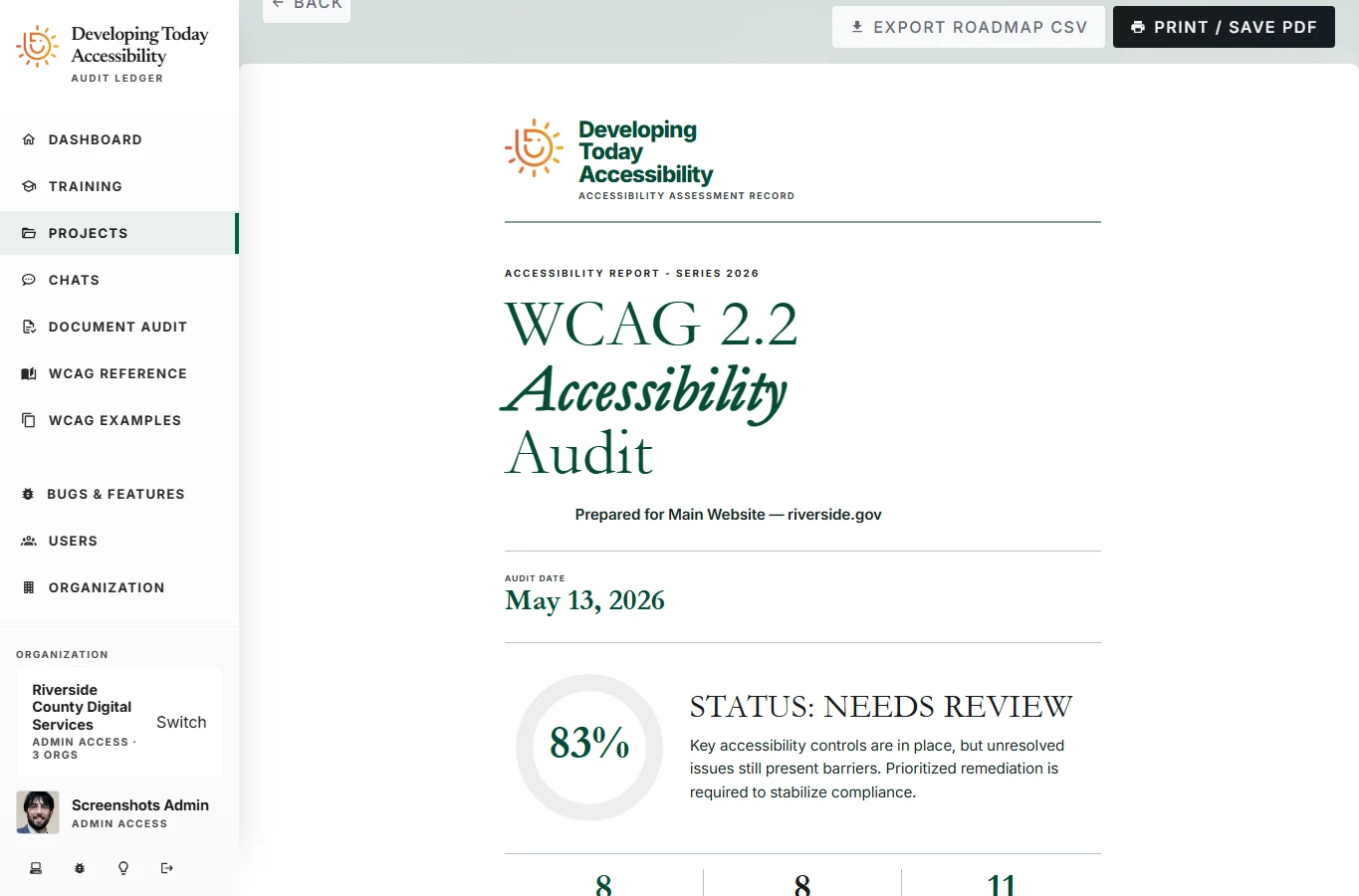
Our accessibility software brings scan results and manual reviews into one report, so your team can see what needs fixing and decide what to work on next.
- Scope and criteria, visible.
- An executive summary, audited pages, selected WCAG target, and criteria scorecard explain what was examined and where review is still needed.
- Findings connected to action.
- Detailed findings and a remediation roadmap give the team a useful next step. The testing methodology stays with the report.
- Reports people can work with.
- Print-ready reports and CSV exports for page scope, findings, scorecards, and remediation support both review meetings and the work that follows.
See how manual review sits alongside automated findings
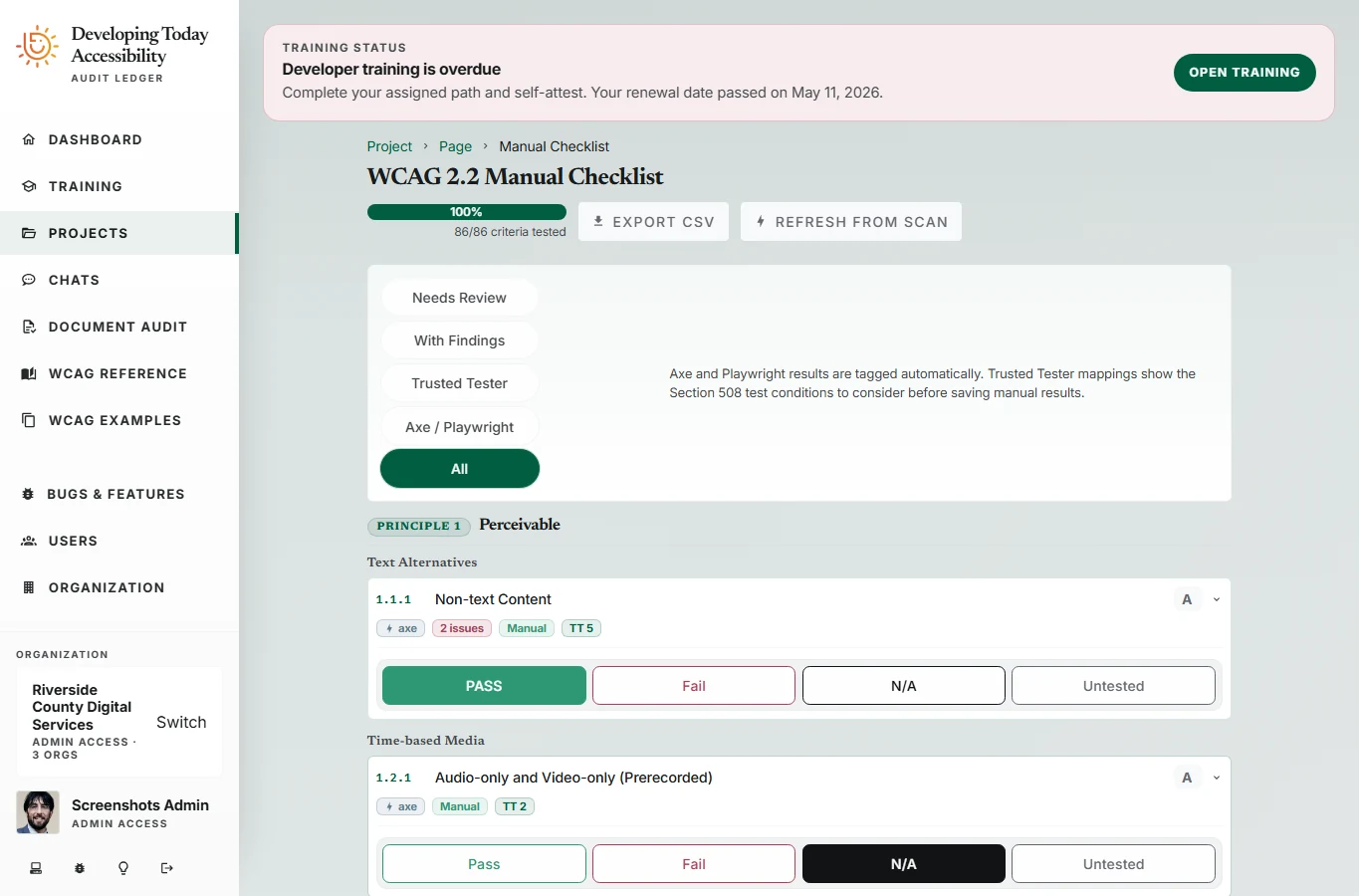
Reviewers can record pass, fail, not applicable, or untested against individual criteria. Automated results and human review remain visible, so an unfinished review cannot disappear behind a score.
Checked again with every change.
This website's CI runs unit and integration checks, browser tests, dependency auditing, OWASP ZAP, Lighthouse, axe, IBM Equal Access, and Impeccable on every code push and pull request on our self-hosted runner. Failed checks fail the workflow. Results appear in the build log and summary, and the measured report is included in a successful build.
The same targets stay in place as the site changes. That makes validation a continuing part of development.
Accessibility targets and review
We use axe and IBM Equal Access with WCAG 2.2 AA as our baseline, and pursue AAA wherever possible. Our checks cover keyboard access, expanded content, text spacing, text resizing, and narrow layouts.
Both engines check every redesigned page on desktop and mobile. Our AAA checks include enhanced text contrast, consistent link purpose, and automatic page refresh. We retain items requiring human review for screen-reader evaluation and testing with people with disabilities.
Our test plan uses ADA accessibility guidance and WCAG success criteria.
How to read the scores
Lighthouse results use its standard mobile and desktop profiles against the local production build. Every page runs three times per profile. Each category shows the lowest score across all pages and runs, with individual results in the downloadable report.
Mobile uses simulated network and CPU throttling. This measures the built pages in a lab environment. Hosting and network conditions are tested again after deployment.
Read how Lighthouse works and what its accessibility score measures.
Trouble using this website?
We want you to be able to find and use the information here. If something isn't accessible, email us or call. Tell us which page you were on, what you were trying to do, and what got in the way. Your browser and assistive technology, if you use one, can help us understand the problem.
We'll work with you to get the information you need and address the problem.